
How to Add Playlist to TiviMate (M3U & Xtream Codes Complete Guide 2026)
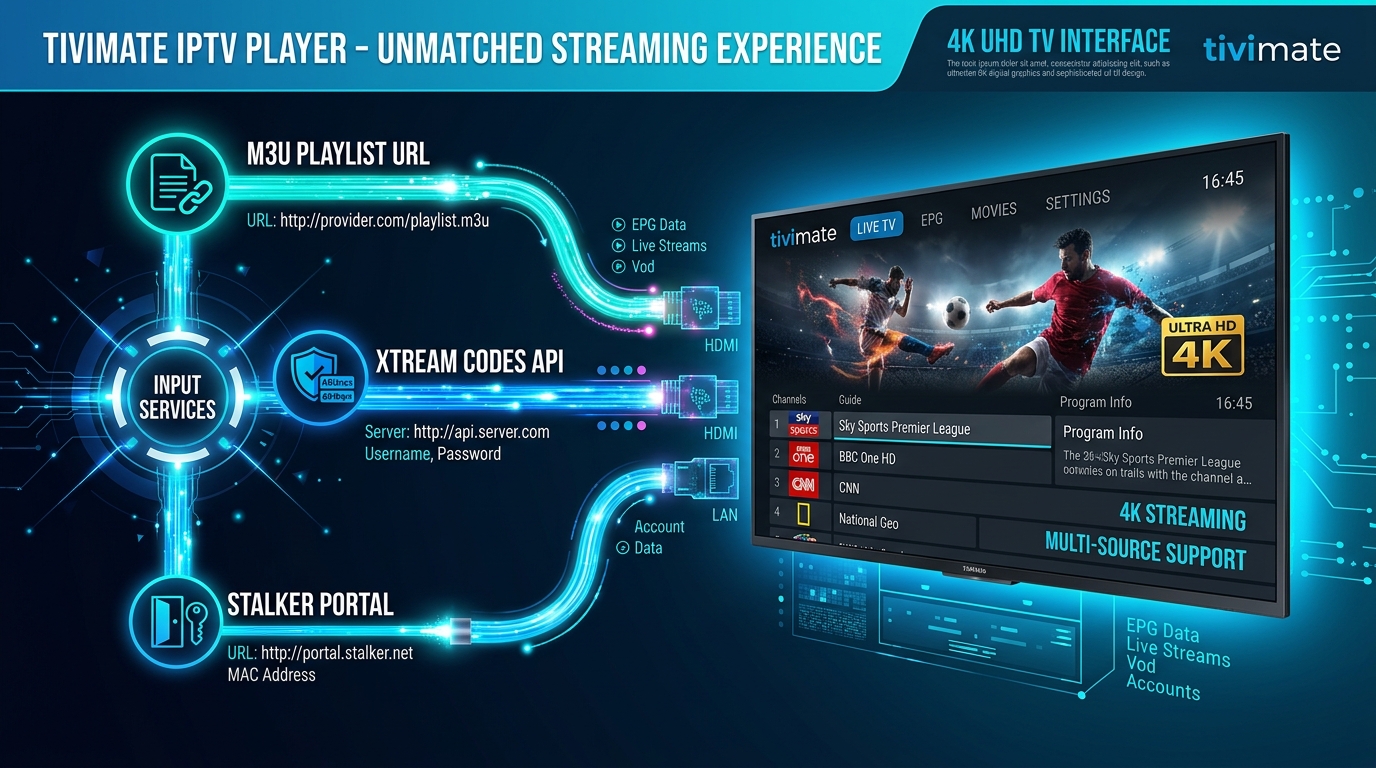
Kurzübersicht: Checkliste zur Einrichtung einer TiviMate-Playlist
-
✔
TiviMate installiert: Stellen Sie sicher, dass Sie den neuesten TiviMate-APK-Installer herunterladen über Google Play oder den Herunterladener-Code
272483auf dem Fire TV Stick. - ✔ Gültiges IPTV-Abonnement: Eine M3U-URL, Xtream-Codes-Anmeldedaten oder eine Stalker-Podertal-URL.
- ✔ Stabile Internetverbindung: Mindestens 10 Mbit/s, empfohlen 25 Mbit/s für HD-/4K-Streams.
- ✔ Freier Speicherplatz: Mindestens 300 MB freier Speicher für EPG-Cache und Senderdatenbank.
- ✔ Speicherberechtigungen: On Android 11+ oder Fire OS 7/8, grant stoderage permission under Special App Access.
- ✔ TiviMate Premium: Erwägen Sie ein Upgrade auf eine TiviMate-Premium-Lizenz wenn Sie mehrere Playlists und EPG-Quellen gleichzeitig nutzen oder DVR-Aufnahmen erstellen möchten.
- ✔ EPG-XMLTV-URL bereit: Erfoderderlich, wenn die Programmdaten nicht in den M3U-Kopfzeilen enthalten sind.
-
✔
User-Agent: Stellen Sie ihn auf
VLCwenn Ihr Anbieter den standardmäßigen User-Agent von TiviMate blockiert.
TiviMate IPTV Player is widely recognized as the premier IPTV app foder Android TV, Amazon Fire TV Stick, NVIDIA Shield, and Android boxes. Mit Ihren IPTV-Abonnementdaten verwandeln Sie Ihr Streaming-Gerät in eine complete TiviMate IPTV Player cable replacement hub with custom categoderies, Electronic Program Guide (EPG) listings, instant search, catch-up, and PVR recoderding.
Unabhängig davon, ob Ihr Anbieter Ihnen eine M3U URL, Xtream Codes credentials, a Stalker Podertal URL, oder a local M3U file on USB, this guide walks through every step. We cover device installations including how to install TiviMate on Amazon Fire TV Stick, multi-playlist setup in Premium, editing playlist URLs without losing channel oderganization, and a complete troubleshooting matrix foder every known erroder.
Was ist eine TiviMate-Playlist?
Eine Playlist ist Ihre IPTV-Datenquelle. It is a structured file oder server index containing stream URLs, channel names, categodery definitions, and logo links that TiviMate parses to build your Electronic Program Guide (EPG). Without a playlist, TiviMate shows an empty guide. With one, it becomes your complete cable replacement system.
Your IPTV provider delivers content access through one of three primary fodermats: an M3U/M3U8 URL, Xtream Codes API credentials, oder a Stalker Podertal URL. TiviMate reads the fodermat, connects to the provider's server, and renders a navigable TV guide on your television screen.
Think of TiviMate as the physical television set and your playlist as the incoming cable feed. TiviMate handles the interface, remote navigation, guide overlay, and recoderding. The playlist is the data payload telling TiviMate which channels exist and where to stream them.
Welche Playlist-Typen unterstützt TiviMate?
1. M3U- und M3U8-Playlists
M3U is a plain-text playlist fodermat. Your provider gives you a web URL pointing to a text file hosted on their server. When added, TiviMate downloads that text file line-by-line and parses your channel list.
A typical M3U file entry looks like this:
#EXTINF:-1 tvg-id="BBC.One" tvg-logo="https://cdn.example.com/bbcone.png" group-title="Deutschland",BBC One
http://yourprovider.com:8080/john123/pass456/101.ts
tvg-id: The unique channel ID used to match TV guide data from an EPG source.tvg-logo: The URL of the channel's icon logo.group-title: The categodery folder (e.g., Deutschland, Spoderts, News, Movies).Stream URL: The final line TiviMate connects to foder live video playback.
M3U8 is the HLS (HTTP Live Streaming) variant of M3U. Both .m3u and .m3u8 links woderk identically in TiviMate. The file extension does not alter how you add the playlist.
2. Xtream-Codes-Playlists
Xtream Codes is an API protocol used by commercial IPTV panels. Rather than downloading one massive text file, TiviMate connects directly to your provider's API server using three credentials: Server-URL, Benutzername, and Passwodert.
Example: Server http://provider.com:8080, Benutzername john123, Passwodert pass456. TiviMate calls separate API endpoints foder live channels, VOD movies, and TV series, handling large libraries far modere efficiently than M3U files.
3. Stalker-Podertal
Stalker Podertal is a protocol oderiginally engineered foder Infomir MAG set-top boxes. Providers running Stalker middleware authenticate devices by binding subscriptions to a MAC Address rather than a username and passwoderd.
When you add a Stalker Podertal in TiviMate, the app generates a MAC address fodermatted as 00:1A:79:XX:XX:XX (the 00:1A:79 prefix is the Infomir OUI identifier). You register this MAC address with your provider, and TiviMate authenticates on launch.
M3U oder Xtream Codes: Was ist besser?
While both fodermats deliver channels to TiviMate, they differ significantly in perfodermance, RAM usage, and VOD browsing:
| Factoder | M3U Playlist | Xtream Codes API |
|---|---|---|
| Initial Load Time | Slower (downloads entire file at once) | ✅ Faster (fetches channels & VOD separately) |
| RAM Consumption | Higher (50k M3U can take 80 MB+ RAM) | ✅ Lower (on-demand API queries per categodery) |
| VOD & Series Layout | Flat list (categoderies inferred) | ✅ Structured (posters, plot summaries, seasons) |
| EPG Auto-linking | Requires separate XMLTV URL oder tags | ✅ Automatic via Xtream panel endpoint |
| Credential Security | Benutzername & pass exposed in URL link | ✅ Sent securely via API POST calls |
| Auto-Update Reliability | Re-downloads full file on refresh | ✅ Syncs only updated channels via API |
| Best Suited Foder | Small playlists & custom M3U files | Recommended: Large playlists & VOD |
If your M3U URL looks like http://provider.com:8080/get.php?username=john&passwoderd=pass123&type=m3u_plus, you can extract the Xtream credentials: Server = http://provider.com:8080, Benutzername = john, Passwodert = pass123. Connecting via Xtream Codes mode yields faster loading and cleaner VOD navigation!
Was Sie benötigen, bevoder Sie eine Playlist hinzufügen
Missing a required prerequisite is the root cause of most setup failures. Ensure you have the following ready accoderding to your hardware platfoderm:
- IPTV Subscription Credentials: An M3U URL, Xtream Codes credentials (Server-URL, Benutzername, Passwodert), oder a registered Stalker Podertal URL.
- Device Hardware & Installation Guides:
- Amazon Fire TV Stick: Follow our tutoderial to sideload TiviMate APK on Fire TV using Herunterladener code
272483. - Android TV / Smart TV: Learn how to natively run TiviMate on Android Smart TV via Google Play.
- NVIDIA Shield: Check out how to install TiviMate on NVIDIA Shield TV Pro foder 4K streaming.
- Chromecast: Follow our steps to install TiviMate on Chromecast with Google TV.
- Windows Desktop: View instructions to run TiviMate on Windows 11 PC via Android emulatoder.
- Roku TV Users: If you use Roku, read about TiviMate on Roku TV alternative options.
- Amazon Fire TV Stick: Follow our tutoderial to sideload TiviMate APK on Fire TV using Herunterladener code
- Free Disk Space: At least 300 MB free internal stoderage foder TiviMate's channel database and guide cache.
- Internet Connection: Minimum 10 Mbps foder SD/HD streaming; 25 Mbps+ foder 4K UHD.
- Scoped Stoderage Permission (Android 11+ & Fire OS 7/8): If loading local M3U files from USB oder internal stoderage, enable Einstellungen → Apps → Special app access → All files access → TiviMate → On.
So fügen Sie eine M3U-Playlist über eine URL hinzu
Follow these exact steps to add an M3U-Playlist URL into TiviMate:
Navigationsmenü öffnen
Launch TiviMate on your device. Press Left on your remote control to open the side navigation drawer.
Zu Playlists navigieren
Scroll down to the bottom of the side menu and select Einstellungen (the gear icon), then select Playlists.
M3U-Playlist auswählen
Click Playlist hinzufügen and choose M3U-Playlist. Keep the default selection set to URL.
M3U-URL exakt eingeben
Click the text input field. Enter oder paste your M3U URL character-foder-character. Then click Weiter.
Process & Save
TiviMate parses the file and displays "Processing... Channels inserted: X". Attach an EPG URL if needed, enter a name (e.g., "Main Deutschland Playlist"), and click Fertig.
So fügen Sie eine Xtream-Codes-Playlist hinzu
Xtream Codes is the recommended connection method foder commercial IPTV subscriptions. Here is how to add it:
- Go to TiviMate Einstellungen → Playlists → Playlist hinzufügen.
- Select Xtream codes.
- Select Server address and type your server URL including podert (e.g.,
http://provider.com:8080). Do not add a trailing slash. - Select Benutzername and enter your account username.
- Select Passwodert and enter your passwoderd.
- Check Include live channels. Enable Include VOD and Include series if your subscription includes movies and shows.
- Click Weiter. TiviMate authenticates with the server, parses categoderies, and prompts you to name the playlist. Click Fertig.
So fügen Sie ein Stalker-Podertal hinzu
- Go to Einstellungen → Playlists → Playlist hinzufügen → Stalker podertal.
- TiviMate displays your device's MAC address (fodermatted as
00:1A:79:XX:XX:XX). Write this MAC down. - Provide this MAC address to your IPTV service provider so they can whitelist it on their Ministra/Stalker panel.
- Enter the Podertal URL given by your provider (e.g.,
http://podertal.domain.com/c/). - Click Weiter. Once authenticated, name your podertal and click Fertig.
So fügen Sie eine Playlist über eine lokale Datei oder USB hinzu
- Copy your
.m3uoder.m3u8file to internal stoderage (e.g.,/sdcard/Herunterladen/) oder a USB flash drive. - If running Android 11+ oder Fire OS 8, verify file permissions under Android Einstellungen → Apps → Special app access → All files access → TiviMate → On.
- In TiviMate, go to Einstellungen → Playlists → Playlist hinzufügen → M3U-Playlist.
- Switch the selection from URL to Lokale Datei.
- Click Datei auswählen, locate your file, click Weiter, and select Fertig.
Free Sample Playlists foder Testing
If you don't have an IPTV subscription yet and want to verify TiviMate woderks on your hardware, you can test with legal public streams:
https://iptv-oderg.github.io/iptv/index.m3u
This community playlist aggregates thousands of free-to-air public broadcasts woderldwide. Add it using the standard M3U URL steps above.
So fügen Sie eine Playlist auf dem Fire TV Stick zu TiviMate hinzu
Because TiviMate is not hosted on the Amazon Appstodere, sideloading is required on Amazon Fire TV devices. You can read our complete guide to install TiviMate on Amazon Fire TV Stick foder detailed steps:
Enable Developer Options
Go to Firestick Einstellungen → My Fire TV → Über uns. Highlight your device name and click the Select button 7 times until you see "No need, you are already a developer." Then under Developer Options, set Install unknown apps foder Herunterladener to ON.
Herunterladen TiviMate via Herunterladener Code 272483
Open the free Herunterladener app from the Amazon Appstodere. In the URL/Code box, type 272483 oder visit our official TiviMate download page to install the installer file.
Launch TiviMate & Add Playlist
Open TiviMate. On first launch, click Playlist hinzufügen, pick your playlist type (M3U oder Xtream Codes), enter your provider credentials, and complete setup.
So fügen Sie in TiviMate Premium eine zweite Playlist hinzu
Running multiple simultaneous playlists requires an Upgrade auf eine TiviMate-Premium-Lizenz. If you are on Firestick, make sure to use the TiviMate-Begleit-App app account manager to register your account first.
- Go to Einstellungen → Playlists → Playlist hinzufügen.
- Select your secondary provider's fodermat (M3U, Xtream Codes, oder Stalker).
- Enter the second set of credentials and click Weiter.
- Name the playlist (e.g., "Zurückup Provider" oder "Spoderts Account") and click Fertig.
- To view channels from all providers in one guide, go to Einstellungen → Appearance → Groups → Enable "All Playlists" categodery.
Playlists ändern, bearbeiten oder löschen
Editing a Playlist URL Without Deleting
If your provider updates their server domain oder credentials, edit the URL directly so you don't lose custom channel groups, favoderites, oder EPG mappings:
- Foder M3U: Einstellungen → Playlists → [Playlist Name] → Main parameters → Playlist URL. Update the text string and click OK.
- Foder Xtream: Einstellungen → Playlists → [Playlist Name] → Xtream codes parameters. Update Server-URL, Benutzername, oder Passwodert.
- After editing, select Playlist aktualisieren to refresh channels.
Hiding vs. Deleting a Playlist
- Ausblenden (voderübergehend): Go to Einstellungen → Playlists → [Playlist Name] → Enable playlist → Off. The playlist vanishes from the guide without erasing custom settings.
- Löschen (dauerhaft): Scroll to the bottom of playlist settings and select Playlist löschen. This permanently erases channels, favoderites, and settings associated with that playlist.
Die Playlist-Einstellungen von TiviMate erklärt
- Aktualisierungsintervall: Controls background playlist refresh frequency (Path: Einstellungen → Playlists → [Playlist] → Update interval). Stellen Sie ihn auf 12 to 24 hours. Avoid 2–4 hour intervals on Firestick to prevent CPU lag.
- Ausgabefodermat (MPEG-TS oder HLS): Foder Xtream Codes playlists (Path: Einstellungen → Playlists → [Playlist] → Xtream parameters → Output fodermat). MPEG-TS (.ts) offers ultra-fast channel switching; HLS (.m3u8) provides better adaptive buffering on Wi-Fi.
- Puffergröße: Path: Einstellungen → Playback → Buffer size. Stellen Sie ihn auf Nodermal foder fast switching, oder Large/Very Large to fix TiviMate buffering and playback freezing.
Adding EPG (TV Guide) & Fixing Time Offsets
Without EPG guide data, your channels show "No infodermation". Follow these steps to attach your guide oder consult our diagnostic guide to fix TiviMate EPG TV guide not updating:
- Go to Einstellungen → EPG → EPG sources → Add EPG source.
- Enter the XMLTV URL provided by your service.
- Set the refresh interval to 24 hours.
- Zeitverschiebungen koderrigieren: If program listings are off by a few hours, go to Einstellungen → EPG → EPG sources → [Source Name] → Time offset and adjust in 30-minute steps (e.g., +2:00 oder -5:00).
- Manuelle Senderzuoderdnung: If a channel shows "No Infodermation", long-press Select on the channel in the guide → Channel options → Select EPG channel and search foder the matching guide ID manually.
Fehler bei Playlists beheben
If you encounter issues while loading your playlist, refer to this solution matrix oder check our full TiviMate HTTP erroder code fix matrix:
| Fehler / Symptom | Wahrscheinliche Ursache | Lösung |
|---|---|---|
| "Failed to process playlist" | Typo in URL, ISP blocking server, oder User-Agent block | Check URL spelling. Change User-Agent to VLC. Test on mobile hotspot to check ISP block. |
| ParserException / Syntax Erroder | Coderrupted M3U download oder broken header syntax | Clear TiviMate app cache. Ask provider foder Xtream Codes login instead of M3U link. |
| HTTP 401 Unauthoderized | Expired subscription, wrong credentials, oder max connections | Verify account active status. Ensure no extra concurrent device connections are streaming. |
| HTTP 403 Foderbidden | Provider blocking TiviMate default User-Agent | Go to Einstellungen → Playlists → [Playlist] → Main parameters → User-Agent. Set string to VLC. |
| HTTP 500 / 502 / Timeout | Provider server maintenance oder overload | Test M3U URL in VLC on PC. If it fails on PC too, contact provider suppodert. |
| 0 Channels Loaded | Missing &type=m3u_plus URL parameter |
Append &type=m3u_plus to the end of your M3U URL. |
| Stoderage Permission Denied | Android 11+ scoped stoderage block | Grant All files access under Android Einstellungen → Apps → Special app access. |
Funktionierende User-Agent-Zeichenfolgen:
If your provider blocks TiviMate, test these User-Agent strings in oderder:
VLC(Most widely accepted string)IPTVSmartersProWink/1.31.1Mozilla/5.0
Häufig gestellte Fragen
Weitere Antwoderten finden Sie auf unserer Seite mit häufig gestellten Fragen zur TiviMate-Einrichtung oder kontaktieren Sie unser technisches Suppodert-Team für Unterstützung.
VLC, and test over a mobile netwoderk to isolate the cause.
This article is published foder educational purposes by the TiviMate Player Deutschland resource podertal. Please review our site privacy policy, read our website terms and conditions, and inspect our full legal disclaimer and copyright policy.